One of my interests in the Teensy is the built-in RTC. Especially since the RTC module I was using last summer with an arduino ended up loosing time pretty quick (as I recall it would loose an hour a week).
PJRC’s information on time and Teensy can be found here:
http://www.pjrc.com/teensy/td_libs_Time.html#teensy3
Setting up the Hardware
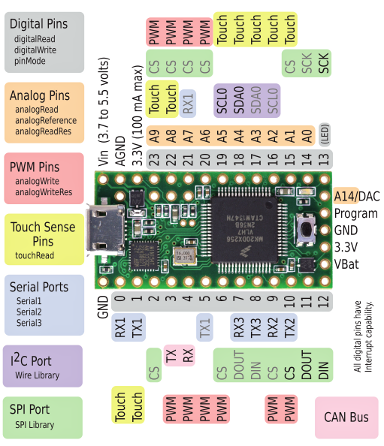
True to form, I didn’t really research the Teensy, I just bought it. So once I got it I found it doesn’t have RTC ability until you solder a crystal onto the board.
The recommended crystal is Citizen part CFS-206, Digikey part 300-8303-ND, 300-8762-ND, 300-8763-ND, or 300-1002-ND. I noticed Jameco sells a 32.768 kHz, 12.5 pF crystal as well. Since I already needed some parts from Jameco, I bought the crystal there.
It appears the Jameco crystal ended up being just a smidge too long to solder into place with the headers I already soldered into place. I placed the crystal on top, standing upright. That works so-so for me since some of the headers are about that tall as well. Next time I’ll order the right crystal.
Setting Up Software
Before soldering the crystal into position, I first tested the Teensy RTC. I did so using the TimeTeensy3 program found in File | Examples | Time.
Hello!? That was weird, the RTC was just a few minutes off from the real-time. Now how could that possibly be? The code waits for serial input and if it see ‘T’ <integer> it uses that to set the RTC. Evidently the teensy loader initially sent this data because there is no way I would have accidently typed in the correct 32bit unix time stamp. That’s my theory anyway.
I removed the code that gets the clock from PC and was able to see every time I rebooted the Teensy, it would start at the same date & time. Not 1972 like you would think, but the initial time it evidently retrieved from the PC.
At this point, I soldered on the crystal and hooked up the battery. I altered the TimeTeensy3 program to accept a time from the keyboard only if <CR> is pressed, and a prompt is sent to identify what is going on.
This program works fine. The Teensy starts up, setting the system clock from the Teensy RTC. The user can change the time using the serial port by simply pressing <CR>. To set the time, you need to know the current unix type stamp. This website will help you calculate that:
http://www.unixtimestamp.com/
Here is the source to the program I have running:
#include <Time.h>

void setup()  {

  Serial.begin(9600);
  delay(100);

  Serial.println("Waiting for high DTR");
  while (!Serial.dtr()) {}

  setSyncProvider(getTeensy3Time);
  if (timeStatus()!= timeSet) {
    Serial.println("Unable to sync with the RTC");
    }
  else {
    Serial.println("RTC has set the system time");
    digitalClockDisplay();
    Serial.println();
    }
  }

void loop() {

  time_t t;

  if (Serial.available()) {
    if (Serial.read() == '\r') {
      Serial.setTimeout(5000);
      Serial.print("Enter unix time stamp(input is not echoed):");
      t = Serial.parseInt();
      Serial.print("read: ");
      Serial.println(t);
      if (t != 0) {
        Serial.println("Setting RTC");
        Teensy3Clock.set(t);
        delay(100);
        setTime(Teensy3Clock.get());
        }
      }
    }

  digitalClockDisplay();

  delay(1000);
  }

void digitalClockDisplay() {
  char s[40];

  snprintf(s,sizeof(s),"%02d/%02d/%02d %02d:%02d:%02d",
    month(), day(), year(), hour(), minute(), second());

  Serial.println(s);

  }

time_t getTeensy3Time() {
  return Teensy3Clock.get();
  }
Battery Power Loss
What happens if the battery is disconnected while the Teensy is off?
Noted the time on the Teensy, then cut power to it. 10 secs later I disconnected the battery. I then waited 1 minute to restore the power to the battery and another minute to restore power to the Teensy.
I would expect that either the time comes back as Jan 1, 1972 (time stamp of 0) or the time power was removed from the battery. Neither. The time came back as several minutes before I cut power to the Teensy.
I wondered if setting the RTC might change this initial value that is restored when the battery is restored. So I set the RTC on every second.
That had the curious effect of the Teensy starting with a future time.
So as far as I can tell, there is no rhyme nor reason to what the initial RTC will be set to when power is applied.
Battery Power Drain
My last question is to guesstimate the lifetime of the CR2032 battery.
If the Teensy has power, it doesn’t drain the battery. So if the Teensy is designed to run continuously, then the CR2032 battery is only used during power interruptions.
Connecting it to an ammeter, I find that when the Teensy has no power, it is consuming about 1.6 uA from the CD2032.
Energizer rates their CR2032 at 240mAh. Well, that comes in at 150,000 hours or 17 years. I’m sure that is overly optimistic, but it will certainly last for a couple of years.
Is it Accurate?
I will leave this project assembled and let it run for a while, then update this blog entry. I checked after about 12 hours and it looks like it is a few seconds slow, but I’ll let it run longer and see how it goes.
Update
I’ve spent the last couple of weeks playing with the clock to check its accuracy. Without touching it, it is not too bad. After 7 days I had lost 7 secs. This is pretty good to me. It would take 8.5 weeks before I had lost a minute. But we can make it better.
Looking at the docs for Teensy3Clock.compensate function, you provide it with a corrected PPM/8, PPM being parts per million.
Calculating this is not too difficult. If I lost 7 secs in 7 days, that is 7 secs in 604800 secs. The ratio would be 7:604800. To then get the PPM, multiply by 1M. So the error is 7/604,800 X 1,000,000 or 11.57PPM. Since the compensate function is ppm/8 I need to multiply 11.57PPM by 8 to get 92.59, rounded to an integer is 93 and that is my correction:
Teensy3Clock.compensate(93);
Note that I am using +93 because I need to speed the clock up. If I needed to slow it down 7 secs/week I would use -93.






 Big Dan the Blogging Man